PreCache NetInjector Documentation Center : PreCache NetInjector Administration
Configuration
|
|
PreCache NetInjector Documentation Center : PreCache NetInjector Administration Configuration |
 |
 |
|
|
|
|
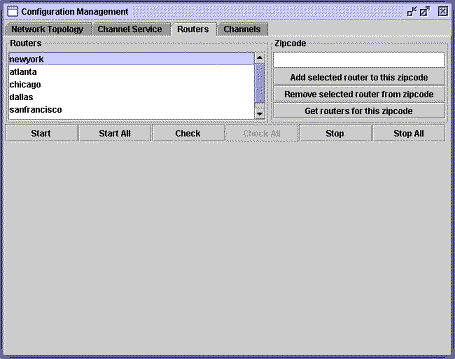
Routers — assigning the physical hardware Each router serves a geographical area or set of areas. Conversely, each region may be served by more than one router or server. AIS handles the task of mapping data flows for a geographical region's subscribers to particular routers, and for the flow of data from routers to particular regions. The routers themselves are not aware of the zip code assignment. You can manage the association between routers and zip codes, as well as start and stop routers. Associate a router with a zip code Zip code assignments may be made after starting AIS.
Manage routers You can start and stop routers, as well as manage zip code associations. Note: You cannot start a router until it has been entered as an operator in the User Management interface.
AIS must be running to start, stop, or shutdown routers. For daily router maintenance, use the Fault Management interface to check router status and to stop processes. |
|